eDiscovery Data Processing: Best Practices for Efficient Legal Workflows
This guide explains the full eDiscovery data processing workflow along with best practices, key software capabilities, and essential roles to help legal teams manage modern data volumes with greater speed, accuracy, and defensibility.
Reading Time
2 minutes
Share
Optimizing eDiscovery Data Processing for Modern Legal Challenges
In today's digital legal landscape, organizations face an unprecedented volume of electronically stored information (ESI) that must be processed for litigation, investigations, and regulatory compliance. eDiscovery data processing has become a critical component of legal workflows, enabling efficient handling of massive datasets while maintaining legal defensibility. This comprehensive guide explores the eDiscovery data processing workflow, best practices for implementation, and key considerations for selecting the right software solutions.
What Is eDiscovery Data Processing?
eDiscovery data processing is the systematic approach to collecting, preserving, and analyzing electronically stored information (ESI) in a legally defensible manner. This process serves as the foundation for the entire eDiscovery lifecycle, transforming raw data into review-ready information that can be used as evidence in legal proceedings.
The eDiscovery data processing process involves several technical stages that require expertise and precision:
Data Identification: Locating potential sources of relevant ESI
Data Collection: Gathering ESI from various sources while maintaining chain of custody
Data Preservation: Ensuring ESI is protected from alteration or deletion
Data Processing: Preparing ESI for review and analysis
Data Analysis: Extracting meaningful insights from processed data
Data Production: Presenting relevant ESI in legally compliant formats
Each stage demands technical expertise and meticulous attention to detail to ensure data integrity, legal admissibility, and cost-effectiveness.
How eDiscovery Data Processing Works
The eDiscovery data processing workflow consists of several key steps that transform raw data into usable evidence:
Ingestion and File Extraction
The initial phase involves collecting data from diverse sources including:
Email systems (Outlook, Gmail, Exchange)
Collaboration platforms (Slack, Microsoft Teams, Zoom)
Document repositories (SharePoint, Google Drive, network shares)
Databases and enterprise systems (ERP, CRM, HR systems)
Mobile devices and cloud storage (iOS, Android, Dropbox, Box)
Social media platforms (LinkedIn, Twitter, Facebook)
Audio and video files (voicemails, recordings, transcripts)
During this stage, data is extracted from various storage devices and formats, including:
Hard drives and servers
Cloud storage platforms
Mobile devices and tablets
Removable media (USB drives, external HDDs)
Enterprise backup systems
Automation plays a crucial role in this phase, particularly when dealing with large volumes of data. Advanced tools can automatically identify and extract relevant files while maintaining metadata integrity.
Initial Filtering
Once data is collected, the next critical step is filtering to remove irrelevant material:
System files (operating system files, temporary files)
Duplicate files (identical copies of the same document)
Non-responsive data (information unrelated to the case)
Spam and junk files (irrelevant emails, advertisements)
Corrupted or unreadable files
Automated filtering tools use sophisticated algorithms to:
Identify and eliminate duplicates using hash values
Remove system files based on file signatures
Filter by date ranges to focus on relevant time periods
Exclude file types that are not pertinent to the case
Apply keyword filters to cull irrelevant content
This filtering process significantly reduces the volume of data that requires further processing and review, saving both time and resources.
Text, Image, and Metadata Extraction
After filtering, the remaining data undergoes extraction of:
Text content from documents, emails, and databases
Outline filtering results (what was included/excluded and why)
Quality control measures ensure that:
All relevant data was properly processed
No critical information was inadvertently excluded
Metadata integrity was maintained
Processing errors were identified and corrected
eDiscovery Data Processing Best Practices
Implementing effective eDiscovery data processing requires adherence to several key best practices:
Be Selective in Data Collection
Not all data is relevant to every case. Best practices include:
Identifying relevant data sources before collection begins
Narrowing collection scope to only necessary custodians and time periods
Understanding data formats and their processing requirements
Avoiding over-collection that increases costs and review time
Documenting collection decisions for defensibility
Selective collection reduces processing volumes and focuses resources on the most relevant information.
Implement Data Governance and Identity Management
Effective data processing relies on robust governance practices:
Data classification to identify sensitive and relevant information
Access controls to limit who can view or process data
Retention policies to ensure compliance with legal requirements
Audit trails to track all processing activities
Chain of custody documentation to maintain legal admissibility
Identity management ensures that only authorized personnel can access and process sensitive data, reducing security risks.
Maintain Data Accessibility for Future Use
Processed data should remain accessible for:
Future litigation that may involve similar issues
Regulatory audits requiring historical data
Internal investigations that may revisit past matters
Knowledge management to leverage past case insights
Best practices for maintaining accessibility include:
Creating comprehensive data inventories
Documenting processing methodologies
Storing processed data in searchable repositories
Implementing version control for updated documents
Establishing clear retention policies
Automate Data Collection and Processing
Automation transforms eDiscovery data processing by:
Reducing manual effort in repetitive tasks
Increasing processing speed for large datasets
Improving consistency across multiple cases
Minimizing human error in data handling
Enabling 24/7 processing without manual intervention
Key areas for automation include:
Data ingestion from multiple sources
Duplicate identification and removal
Metadata extraction and standardization
File format conversion
Quality control checks
Key Qualities of Effective eDiscovery Data Processing Software
When selecting software for eDiscovery data processing, consider these essential qualities:
Scalability
The ability to handle large volumes of data is critical. Look for solutions that can:
Process terabytes of data without performance degradation
Handle diverse file types from emails to multimedia
Scale with your organization's needs as caseloads grow
Support concurrent processing of multiple matters
Adapt to evolving data types (collaboration apps, IoT data)
Scalable solutions like Casepoint are designed to handle the data volumes encountered in modern litigation and investigations.
Speed
Efficiency is crucial in eDiscovery where deadlines are tight. Prioritize software that offers:
High-speed processing of large datasets
Parallel processing capabilities for multiple tasks
Optimized algorithms for quick data extraction
Real-time progress tracking to monitor processing status
Rapid search and retrieval of processed data
Advanced processing engines use machine learning to accelerate data extraction and analysis without sacrificing accuracy.
Accuracy
Precision is non-negotiable in legal proceedings. Ensure your software provides:
High-fidelity data extraction that preserves original content
Comprehensive metadata capture for all file types
Advanced OCR capabilities for image-based documents
Error detection and correction mechanisms
Validation protocols to verify processing results
Machine learning-enhanced processing improves accuracy over time by learning from previous cases and user corrections.
Ease of Use
User-friendly interfaces are essential for adoption across legal teams. Look for:
Intuitive dashboards for monitoring processing status
Customizable workflows that match your team's processes
Clear documentation and in-app guidance
Minimal training requirements for new users
Role-based access tailored to different user needs
Well-designed software reduces the learning curve and enables legal professionals to focus on case strategy rather than technical complexities.
Security
Data security is paramount when handling sensitive legal information. Essential security features include:
End-to-end encryption for data in transit and at rest
Granular access controls based on user roles
Multi-factor authentication for system access
Comprehensive audit logs tracking all user activities
Compliance certifications (ISO 27001, SOC 2, GDPR)
Robust security measures protect against data breaches and ensure compliance with privacy regulations.
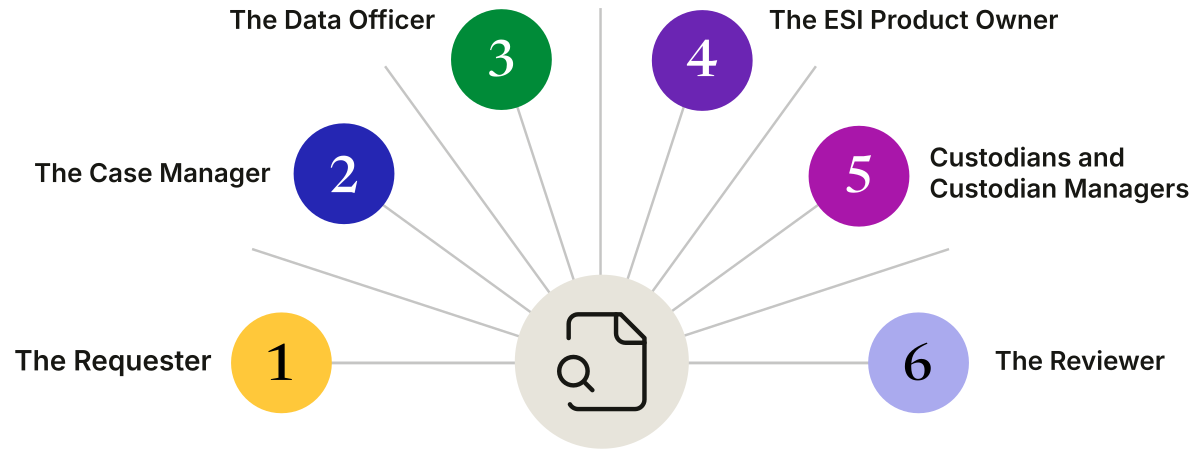
Key Roles in eDiscovery Data Processing
Effective eDiscovery data processing requires coordination among several specialized roles:
The Requester
Typically a lawyer or legal team that:
Initiates the eDiscovery process
Defines the scope of investigation
Identifies relevant custodians and data sources
Sets criteria for data collection and processing
Ensures alignment with case strategy
The Case Manager
Oversees the entire eDiscovery process and ensures:
Adherence to legal and ethical guidelines
Proper workflow definition and timeline management
Coordination between technical and legal teams
Quality control throughout the process
Compliance with court orders and regulations
The Data Officer
Responsible for the technical aspects of data processing:
Collecting and preserving data from various sources
Performing initial processing and filtering
Removing duplicates and irrelevant files
Ensuring data integrity and chain of custody
Preparing data for review and analysis
The ESI Product Owner
Focuses on the technical implementation:
Selecting and configuring eDiscovery software
Ensuring software meets case requirements
Troubleshooting technical issues
Optimizing processing workflows
Integrating with other legal tech tools
Custodians and Custodian Managers
Individuals who possess relevant data and their managers who:
Identify and preserve relevant information
Comply with data collection requests
Provide access to necessary systems
Verify completeness of data collections
Maintain data integrity during collection
The Reviewer
Legal professionals who:
Analyze processed data for relevance
Identify privileged and confidential information
Prepare documents for production
Develop case strategies based on findings
Ensure compliance with disclosure requirements
Conclusion: Optimizing eDiscovery Data Processing
eDiscovery data processing has become a cornerstone of modern legal practice, enabling organizations to efficiently handle the vast and complex datasets involved in litigation, investigations, and compliance matters. By implementing best practices and leveraging advanced software solutions, legal teams can:
Reduce processing time through automation and efficient workflows
Improve data accuracy with advanced extraction technologies
Enhance security through robust protection measures
Maintain compliance with evolving legal and regulatory requirements
Control costs by focusing on relevant data and optimizing resources
The future of eDiscovery data processing lies in continued advancements in artificial intelligence, machine learning, and cloud computing. These technologies will further enhance the speed, accuracy, and scalability of data processing, allowing legal teams to focus on strategic analysis rather than technical challenges.
Organizations that invest in comprehensive eDiscovery data processing solutions, train their teams on best practices, and continuously refine their workflows will be best positioned to handle the complexities of modern legal matters while maintaining efficiency, security, and compliance.
Data Processing
Streamline eDiscovery Data Processing With Casepoint for Speed and Compliance