In modern legal proceedings, the protection of sensitive information through redaction has become an essential component of eDiscovery. Automated redaction tools have revolutionized this process, making it faster, more accurate, and less prone to human error. This comprehensive guide explores the different types of automated redaction tools, their key features, and the significant benefits they bring to legal professionals handling sensitive documents.
Understanding Redactions in eDiscovery
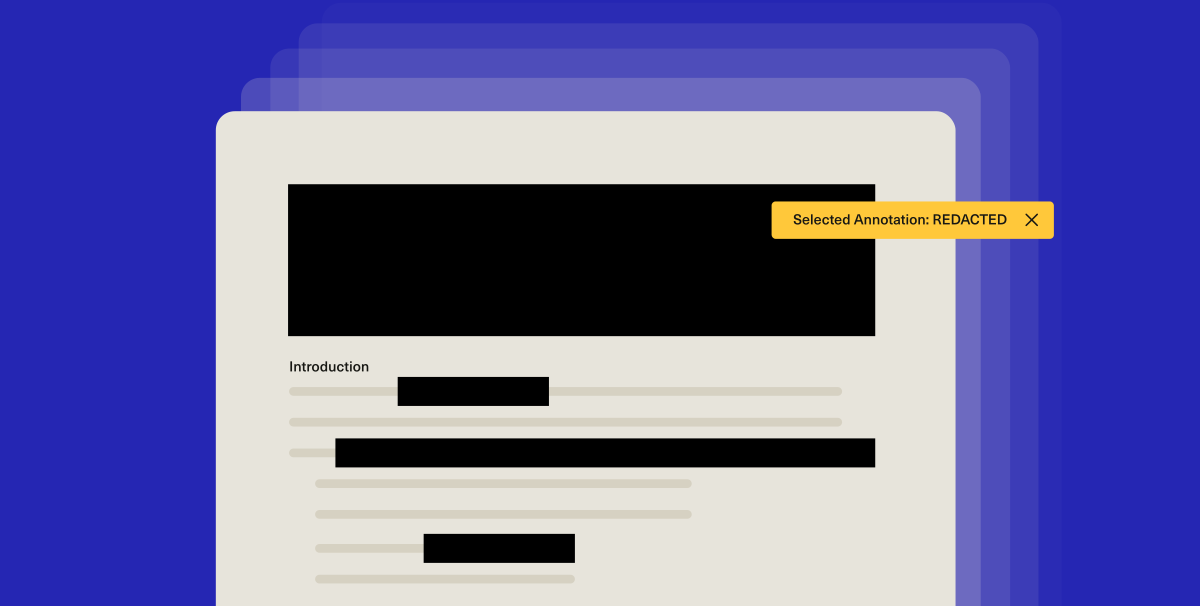
What Does "Redacted" Mean?
Redactions refer to the process of editing or censoring a document, text, or media to remove or conceal sensitive or confidential information before its publication or disclosure. In legal contexts, this process is crucial for:
-
Protecting privacy and preventing identity theft
-
Safeguarding national security in government documents
-
Maintaining attorney-client privilege in legal proceedings
-
Complying with data protection regulations such as GDPR and HIPAA
In redacted documents, sensitive information is typically replaced with black bars or white spaces, clearly indicating that content has been removed while allowing the remainder of the document to be shared.
The Necessity of Redactions in Legal Proceedings
Redactions serve several critical purposes in legal and eDiscovery contexts:
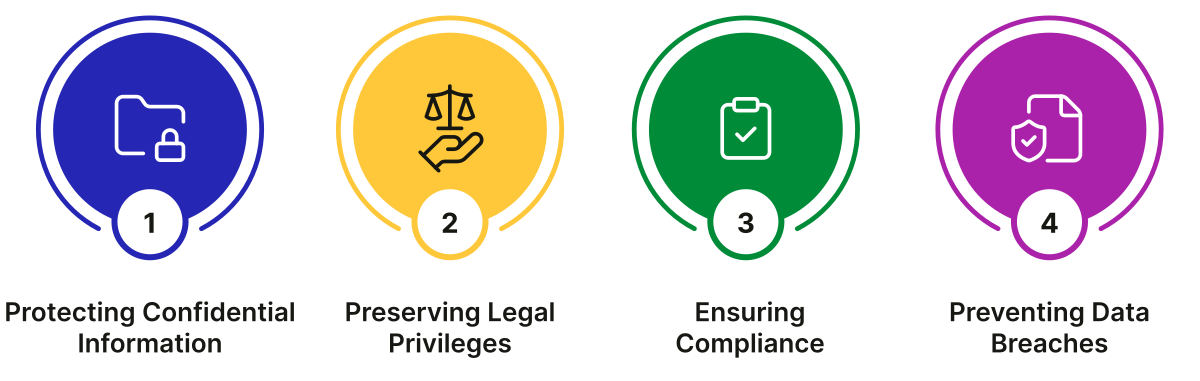
Before the advent of automated tools, redaction was a manual, time-consuming process prone to human error. Modern eDiscovery automated redaction tools have transformed this process, making it more efficient and reliable.
What Are eDiscovery Automated Redactions?
Definition of eDiscovery Automated Redactions
eDiscovery automated redactions refer to software tools that programmatically identify and obscure sensitive information within electronic documents. These tools leverage advanced technologies including:
-
Pattern matching algorithms to detect specific data formats
-
Rule-based systems for consistent application of redaction rules
-
Artificial intelligence for contextual understanding
-
Machine learning to improve accuracy over time
How eDiscovery Automated Redactions Work
Automated redaction tools function through a multi-step process:
-
Document Analysis: The software scans electronic documents to identify potential sensitive information.
-
Pattern Recognition: Algorithms detect specific patterns such as Social Security numbers, credit card numbers, or email addresses.
-
Contextual Understanding: Advanced tools use AI to understand the context of information, distinguishing between relevant content and sensitive data that requires protection.
-
Redaction Application: The software applies the appropriate redaction technique, obscuring or removing the identified sensitive information.
-
Quality Control: Many tools include verification steps to ensure accurate redaction before finalizing documents.
This automated approach significantly reduces the time and effort required for redaction while improving accuracy and consistency.
Advantages of Using eDiscovery Automated Redactions
Automated redaction tools offer several significant benefits over manual processes:
-
Time Savings
Automated tools can process thousands of documents in minutes, dramatically reducing the time required compared to manual redaction.
-
Improved Accuracy
Algorithmic pattern matching and AI-powered analysis reduce human errors and ensure consistent application of redaction rules.
-
Enhanced Security
Automated systems minimize the risk of accidental disclosure of sensitive information during the redaction process.
-
Cost Efficiency
By reducing the need for manual review, automated tools significantly lower labor costs associated with document redaction.
-
Scalability
Automated solutions can handle large volumes of documents and diverse data types, making them suitable for complex litigation and large-scale eDiscovery projects.
-
Auditability
Many tools automatically generate redaction logs and audit trails, providing documentation for compliance and legal requirements.
-
Consistency
Automated systems apply redaction rules uniformly across all documents, eliminating variations that can occur with manual processes.
Types of eDiscovery Automated Redactions
-
Full Document Redaction
Full document redaction involves obscuring or removing all content from an entire document. This approach is typically used when:
-
The entire document contains privileged or confidential information
-
The document's content is irrelevant to the case but contains sensitive data
-
Court orders or legal requirements mandate complete redaction
Automated tools can apply full document redaction quickly and consistently across large document sets.
-
Partial Redaction
Partial redaction targets specific sensitive information within a document while preserving the remaining content. This is the most common type of redaction and is used when:
-
Only certain sections of a document contain sensitive information
-
The document contains a mix of relevant and irrelevant information
-
Specific data elements (like names or account numbers) need protection
Automated systems excel at partial redaction by precisely identifying and obscuring only the necessary information.
-
Dynamic Redaction
Dynamic redaction represents the most advanced form of automated redaction, where the software adapts its approach based on:
-
Contextual understanding of document content
-
User roles and permissions (role-based redactions)
-
Changing redaction requirements throughout a case
-
Specific case parameters and legal requirements
Dynamic redaction systems can automatically adjust what information is redacted based on who is viewing the document and the stage of the legal proceeding.
PDF documents are particularly common in legal proceedings, making PDF redaction a critical capability. The process typically involves these steps:
-
Open the PDF using a dedicated PDF editor or eDiscovery software with redaction capabilities.
-
Select the Redaction Tool from the software's toolbar or menu options.
-
Mark the Text or Areas that require redaction, either by highlighting specific text or selecting regions of the document.
-
Apply the Redaction, which permanently removes or obscures the selected content.
-
Save the Document with redactions permanently applied, ensuring the original content cannot be recovered.
Advanced PDF redaction tools offer additional capabilities such as:
-
Batch processing for multiple documents
-
OCR (Optical Character Recognition) for scanned documents
-
Metadata redaction to remove hidden information
-
Redaction verification to ensure complete obscuring of sensitive content
Types of Redactions in PDF Documents
-
Text Redaction
Text redaction focuses on removing specific words, phrases, or sections of text from a document. This is the most common type of PDF redaction and is used to:
-
Protect personally identifiable information
-
Remove privileged communications
-
Obscure confidential business information
-
Comply with court-ordered redactions
-
Image Redaction
Image redaction involves removing or obscuring visual elements within a document, including:
-
Photographs containing sensitive information
-
Graphics with confidential data
-
Screenshots with personal details
-
Scanned documents with handwritten notes
Advanced tools can detect and redact text within images using OCR technology.
-
Page Redaction
Page redaction removes entire pages or sections from a document when:
-
A complete page contains sensitive information
-
Multiple elements on a page require redaction
-
The page is irrelevant to the case but contains confidential data
-
Court orders mandate removal of specific pages
Modern eDiscovery redaction tools offer a range of advanced features:
-
Automated Redaction
The core functionality of redaction tools, automated redaction uses algorithms to:
-
Identify sensitive information patterns
-
Apply consistent redaction rules
-
Process large volumes of documents efficiently
-
Reduce human error in the redaction process
-
Optical Character Recognition (OCR) Capability
OCR technology enables redaction tools to:
-
Recognize text within scanned documents and images
-
Redact information from non-editable files
-
Process handwritten notes and annotations
-
Maintain searchability of redacted documents
-
Batch Processing
Batch processing allows legal teams to:
-
Process multiple documents simultaneously
-
Apply consistent redaction rules across document sets
-
Handle large-scale eDiscovery projects efficiently
-
Reduce overall processing time
-
Audit Trail Functionality
Comprehensive audit trails provide:
-
Documentation of all redaction actions
-
Timestamps and user information for accountability
-
Verification of compliance with redaction requirements
-
Evidence for legal proceedings if challenged
-
Role-Based Access Controls
Advanced tools offer role-based redaction capabilities that:
-
Allow different users to see different versions of documents
-
Maintain security of sensitive information
-
Support collaborative review processes
-
Provide flexibility in information sharing
-
Integration with eDiscovery Platforms
Many redaction tools integrate directly with eDiscovery platforms to:
-
Streamline the redaction process within existing workflows
-
Maintain document relationships and metadata
-
Support end-to-end eDiscovery processes
-
Reduce data transfer between systems
Difference between PDF editors and robust eDiscovery solutions:
-
Adobe Acrobat
A widely used PDF editor with built-in redaction tools that allow for:
-
Permanent removal of sensitive information
-
Batch processing of multiple documents
-
Redaction of both text and images
-
Creation of redaction logs for compliance
-
SaaS eDiscovery Solution: Casepoint
A comprehensive eDiscovery platform that includes:
-
AI-powered redaction capabilities
-
Advanced pattern matching for sensitive data
-
Role-based redaction for secure collaboration
-
Integration with document review workflows
-
Automated redaction logging and auditing
-
Predictive coding for intelligent redactions
-
Bulk redaction capabilities
-
Redaction verification tools
-
Customizable redaction rules
-
Integration with case management features
-
Collaborative redaction workflows
-
Real-time redaction previews
-
Advanced search and redaction capabilities
-
Secure document sharing features
-
Automated PII detection and redaction
-
One-click redaction capabilities
-
Cloud-based processing
-
Cost-effective pricing models
-
Integration with common file types
Challenges in Redactions and How to Overcome Them
While automated redaction tools offer significant advantages, they also present challenges that legal professionals must address:
-
Identification of Sensitive Data
Challenge: Ensuring all sensitive information is properly identified, particularly in large document sets with diverse data types.
Solution:
-
Use advanced AI-powered tools with comprehensive pattern libraries
-
Implement multi-stage verification processes
-
Customize redaction rules for specific case requirements
-
Conduct sample reviews to test effectiveness
-
Maintaining Document Integrity
Challenge: Ensuring redactions don't alter the meaning or context of remaining document content.
Solution:
-
Use tools that preserve document structure and formatting
-
Implement context-aware redaction algorithms
-
Conduct post-redaction reviews to verify document coherence
-
Maintain original document metadata where possible
-
Handling Complex Document Types
Challenge: Redacting information from diverse document formats including emails, spreadsheets, presentations, and multimedia files.
Solution:
-
Select tools with broad format support
-
Implement specialized redaction approaches for different file types
-
Use OCR for image-based and scanned documents
-
Test redaction effectiveness across all document types
-
Ensuring Compliance with Evolving Regulations
Challenge: Keeping up with changing privacy laws and court requirements for redactions.
Solution:
-
Regularly update redaction software and pattern libraries
-
Stay informed about regulatory changes
-
Implement flexible redaction rules that can be easily modified
-
Document compliance efforts thoroughly
-
Balancing Speed and Accuracy
Challenge: Maintaining high accuracy while processing large document volumes quickly.
Solution:
-
Use hybrid approaches combining automated and manual review
-
Implement quality control checkpoints in the workflow
-
Allocate sufficient time for verification of automated redactions
-
Prioritize documents based on sensitivity and relevance
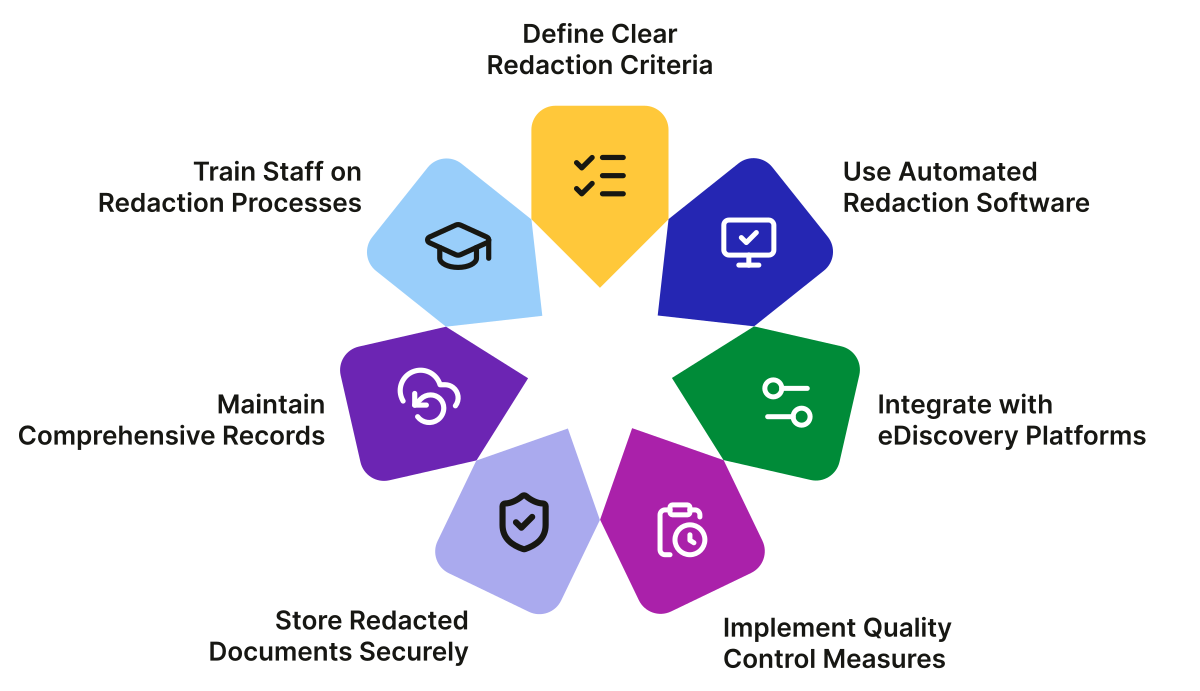
Best Practices for Effective Redactions
-
Define Clear Redaction Criteria
Before beginning the redaction process:
-
Identify all types of information requiring redaction
-
Establish specific rules for different data categories
-
Document the legal basis for each redaction type
-
Communicate criteria clearly to all team members
-
Use Automated Redaction Software
Leverage advanced tools to:
-
Automate the identification of sensitive information
-
Apply consistent redaction rules across documents
-
Reduce manual effort and potential errors
-
Generate comprehensive redaction logs
-
Integrate with eDiscovery Platforms
Choose solutions that:
-
Seamlessly integrate with your eDiscovery software
-
Maintain document relationships and metadata
-
Support end-to-end workflows from collection to production
-
Reduce data transfer between systems
-
Implement Quality Control Measures
Establish verification processes to:
-
Review samples of redacted documents
-
Verify that all sensitive information was properly redacted
-
Ensure redactions don't affect document context or meaning
-
Document quality control results
-
Store Redacted Documents Securely
Follow best practices for document security:
-
Use encrypted storage for redacted files
-
Implement strict access controls
-
Maintain backup copies of original and redacted versions
-
Document storage locations and access logs
-
Maintain Comprehensive Records
Keep detailed documentation of:
-
All redaction decisions and their legal basis
-
The redaction process and tools used
-
Quality control results and verifications
-
Any exceptions or special cases
-
Train Staff on Redaction Processes
Provide comprehensive training on:
-
The legal requirements for redactions
-
Proper use of redaction tools and software
-
Quality control and verification procedures
-
Security protocols for handling sensitive documents
eDiscovery automated redaction tools have revolutionized how legal professionals handle sensitive information in documents. By replacing manual processes with sophisticated software solutions, these tools offer:
-
Dramatic time savings through automated processing
-
Improved accuracy with AI-powered pattern recognition
-
Enhanced security for sensitive information
-
Cost efficiency through reduced labor requirements
-
Better compliance with evolving privacy regulations
-
Scalability to handle large and complex cases
As legal proceedings become increasingly digital and data-intensive, the importance of effective redaction processes continues to grow. Legal professionals who master automated redaction tools and implement best practices will be better positioned to:
-
Handle complex cases with large document volumes
-
Protect sensitive information more effectively
-
Meet tight deadlines without sacrificing quality
-
Maintain compliance with evolving regulations
-
Reduce costs associated with document review
The future of eDiscovery redactions lies in continued advancements in AI and machine learning, which will further enhance the speed, accuracy, and intelligence of automated redaction processes. By staying current with these technologies and implementing robust redaction workflows, legal teams can transform what was once a tedious manual process into a strategic advantage in their legal practice.
Request Demo
Automate Redactions and Reduce Risk with Casepoint eDiscovery
eDiscovery Automated Redactions: Tools, Features, and Benefits